
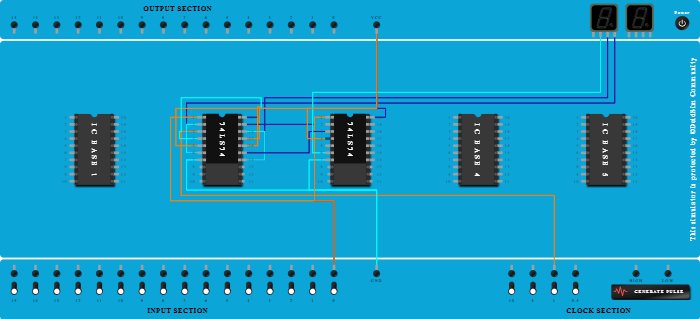
Integrated Circuits Used
Procedure
- Add IC 74LS74 into ICBase-2 (74LS74).
- Add IC 74LS74 into ICBase-3 (74LS74).
- Connect VCC Port to Pin-20 (VCC) of ICBase-2 (74LS74).
- Connect GND Port to Pin-7 (Ground) of ICBase-2 (74LS74).
- Connect Clock port of 1Hz frequency to Pin-3 (Input) of ICBase-2 (74LS74).
- Connect Seven segment display 2 to Pin-6 (Output) of ICBase-2 (74LS74).
- Connect Pin-2 (Input) of ICBase-2 (74LS74) to Pin-6 (Output) of ICBase-2 (74LS74).
- Connect Pin-5 (Output) of ICBase-2 (74LS74) to Pin-17 (Input) of ICBase-2 (74LS74).
- Connect Seven segment display 2 to Pin-14 (Output) of ICBase-2 (74LS74).
- Connect Pin-14 (Output) of ICBase-2 (74LS74) to Pin-18 (Input) of ICBase-2 (74LS74).
- Connect Input-0 to Pin-1 (Input) of ICBase-2 (74LS74).
- Connect Pin-19 (Input) of ICBase-2 (74LS74) to Input-0.
- Connect VCC Port to Pin-4 (Input) of ICBase-2 (74LS74).
- Connect VCC Port to Pin-16 (Input) of ICBase-2 (74LS74).
- Connect VCC Port to Pin-20 (VCC) of ICBase-3 (74LS74).
- Connect GND Port to Pin-7 (Ground) of ICBase-3 (74LS74).
- Connect Pin-1 (Input) of ICBase-3 (74LS74) to Input-0.
- Connect Pin-15 (Output) of ICBase-2 (74LS74) to Pin-3 (Input) of ICBase-3 (74LS74).
- Connect Seven segment display 2 to Pin-6 (Output) of ICBase-3 (74LS74).
- Connect VCC Port to Pin-4 (Input) of ICBase-3 (74LS74).