
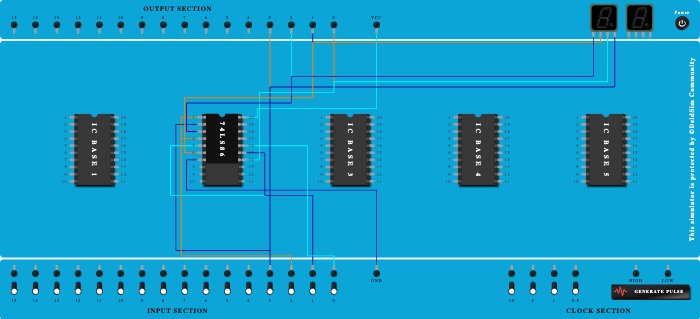
Integrated Circuits Used
Description
gray to binary
Procedure
- Add IC 74LS86 into ICBase-2 (74LS86).
- Connect GND Port to Pin-7 (Ground) of ICBase-2 (74LS86).
- Connect VCC Port to Pin-20 (VCC) of ICBase-2 (74LS86).
- Connect Pin-1 (Input) of ICBase-2 (74LS86) to Input-2.
- Connect Pin-2 (Input) of ICBase-2 (74LS86) to Input-3.
- Connect Output-2 to Pin-3 (Output) of ICBase-2 (74LS86).
- Connect Output-3 to Input-3.
- Connect Output-1 to Pin-6 (Output) of ICBase-2 (74LS86).
- Connect Input-1 to Pin-5 (Input) of ICBase-2 (74LS86).
- Connect Input-2 to Pin-4 (Input) of ICBase-2 (74LS86).
- Connect Pin-15 (Input) of ICBase-2 (74LS86) to Input-1.
- Connect Pin-16 (Input) of ICBase-2 (74LS86) to Input-0.
- Connect Output-0 to Pin-14 (Output) of ICBase-2 (74LS86).
- Connect Seven segment display 2 to Input-3.
- Connect Seven segment display 2 to Pin-14 (Output) of ICBase-2 (74LS86).
- Connect Pin-6 (Output) of ICBase-2 (74LS86) to Seven segment display 2.
- Connect Seven segment display 2 to Pin-3 (Output) of ICBase-2 (74LS86).
- Connect VCC Port to ICBase-2 (74LS86).
- Connect Output-1 to ICBase-2 (74LS86).
- Connect Input-1 to ICBase-2 (74LS86).
- Connect Input-0 to ICBase-2 (74LS86).
- Connect Output-0 to ICBase-2 (74LS86).
- Connect Seven segment display 2 to ICBase-2 (74LS86).
- Connect Seven segment display 2 to ICBase-2 (74LS86).